
学习目标包括:
- 机制:掌握基本的 PyTorch 用法;
- 思维方式:学会资源核算;
- 直觉:把握整体理解,而非大规模模型细节。
主要内容:
- 内存核算:张量基础与内存管理
- 计算核算:GPU 上的张量操作、Einops、操作 FLOPs、梯度计算与 FLOPs
- 模型:参数模块与自定义模型
- 训练循环与实践:随机性说明、数据加载、优化器、训练循环、检查点保存、混合精度训练
动机问题与“纸上估算”摘要:
- 目标:用粗略估算评估训练时间与可训练的最大模型规模。
- 问题1(训练时间):训练 700 亿参数模型、15T tokens、1024 张 H100。
- 假设:
h100_flop_per_sec = 1979e12 / 2,mfu = 0.5。 - 公式:
total_flops = 6 * 70e9 * 15e12flops_per_day = h100_flop_per_sec * mfu * 1024 * 60 * 60 * 24days = total_flops / flops_per_day
- 假设:
- 问题2(最大模型规模):在 8 张 H100 上用 AdamW(朴素实现)能训练的最大参数量。
- 假设:每卡显存
h100_bytes = 80e9;每参数内存:4(参数)+4(梯度)+(4+4(优化器状态))=16字节。 - 公式:
num_parameters = (h100_bytes * 8) / 16。
- 假设:每卡显存
- 注意事项:
-
朴素地用 float32 表示参数与梯度;也可用 bf16(2+2)并保留一份 fp32 参数副本(4),速度更快但不省显存。
-
未计入激活开销(依赖 batch size 与序列长度)。
以上为粗略估算。
-
张量
张量基础
张量是存储一切内容的基本构件,包括参数、梯度、优化器状态、数据与激活。
在 PyTorch 中可通过多种方式创建张量:
torch.tensor([[1., 2, 3], [4, 5, 6]]):直接定义二维张量torch.zeros(4, 8):4×8 全零矩阵torch.ones(4, 8):4×8 全一矩阵torch.randn(4, 8):4×8 标准正态分布随机矩阵torch.empty(4, 8):4×8 未初始化矩阵(可自定义填充值)
未初始化张量常用于后续用特定逻辑赋值,例如:
nn.init.trunc_normal_(x, mean=0, std=1, a=-2, b=2) 进行截断正态初始化。
张量内存
-
存储内容:几乎所有数据(参数、梯度、激活、优化器状态)都以浮点数形式存储。
-
float32(fp32,单精度)
- 默认数据类型,每个数占 4 字节。
- 示例:
torch.zeros(4,8)→ 占用4*8*4=128字节。 - GPT-3 前馈层中的一个大矩阵可达 2.3 GB。

-
float16(fp16,半精度)
- 每个数 2 字节,节省内存。
- 动态范围有限,容易下溢:如
1e-8 → 0。训练中可能导致不稳定。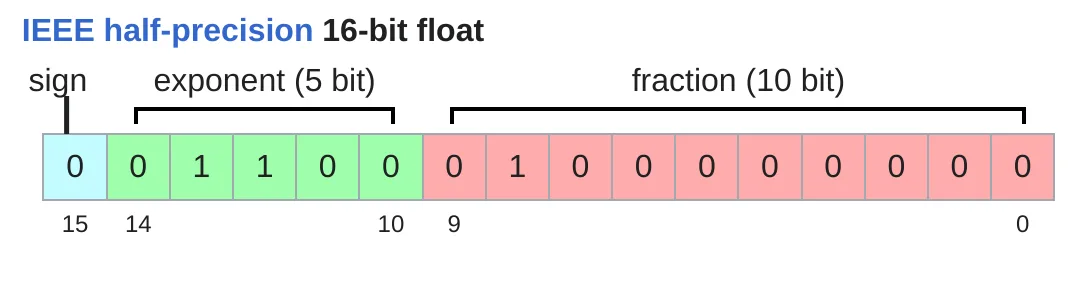
-
bfloat16(bf16)
- Google Brain 2018 提出。
- 占用与 float16 相同内存,但动态范围与 float32 相同,仅分辨率较差。
- 解决了 float16 下溢问题,更适合深度学习。
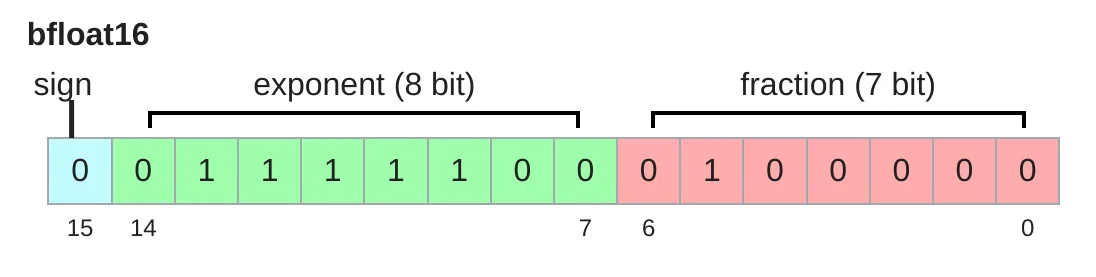
-
fp8
- 2022 年标准化,专为机器学习设计。https://docs.nvidia.com/deeplearning/transformer-engine/user-guide/examples/fp8_primer.html
- H100 支持两种:E4M3(范围 -448448)、E5M2(范围 -5734457344)。 [Micikevicius+ 2022]
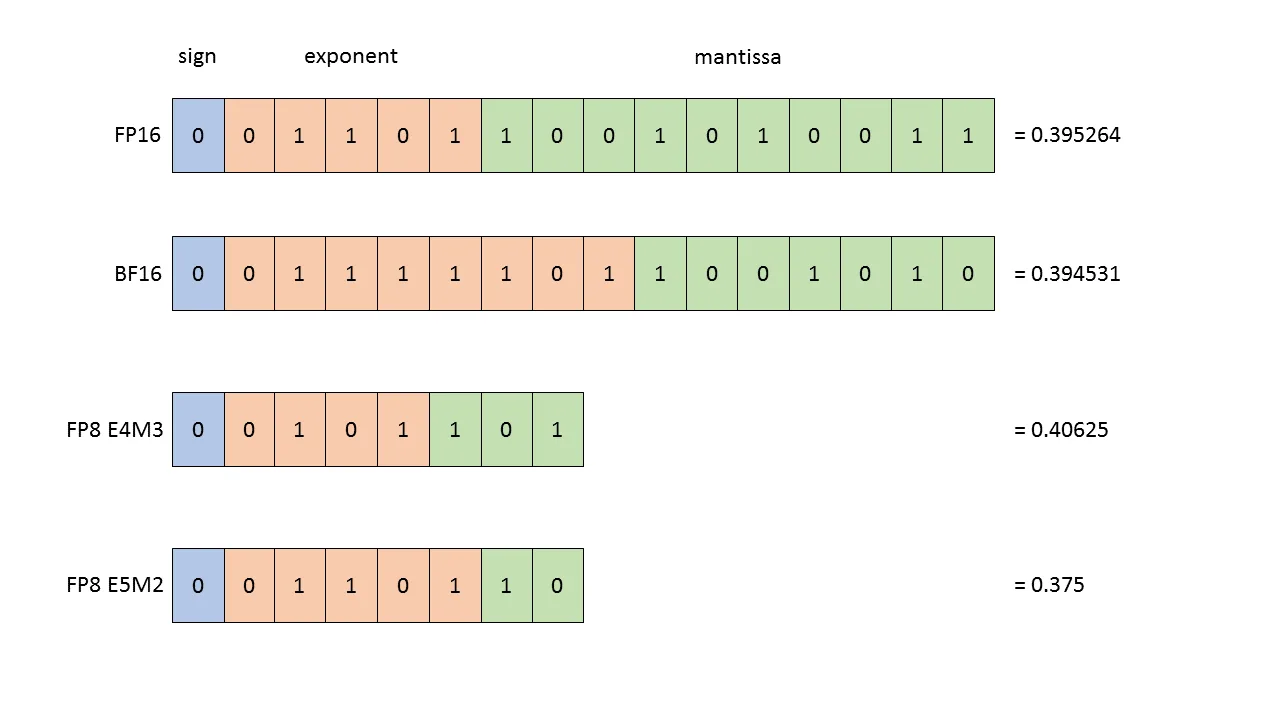
-
训练影响:
- float32 稳定但耗内存。
- fp8、float16、bfloat16 内存更省,但可能带来数值不稳定。
- 解决方案:采用混合精度训练(后续介绍)。
张量在GPU上使用
- 默认情况:张量存储在 CPU 内存中,如
torch.zeros(32, 32)→ 设备为cpu。
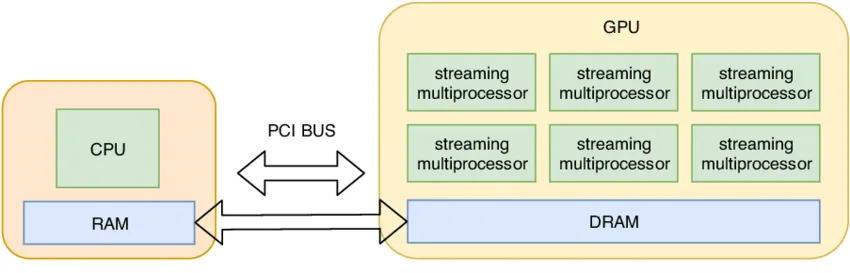
- 利用 GPU 并行性:需将张量转移到 GPU 内存。
- 检查 GPU 可用性:
torch.cuda.is_available() - 获取 GPU 数量:
torch.cuda.device_count() - 查看设备属性:
torch.cuda.get_device_properties(i) - 查看已分配内存:
torch.cuda.memory_allocated()
- 检查 GPU 可用性:
- 将张量转移到 GPU:
y = x.to("cuda:0")→ 张量移至 0 号 GPU。
- 直接在 GPU 创建张量:
z = torch.zeros(32, 32, device="cuda:0")- GPU 内存消耗变化:
memory_used = 2 * (32 * 32 * 4)→ 8192 字节。
张量操作
总体:大多数张量来源于对已有张量的操作,每个操作都有内存与计算代价。
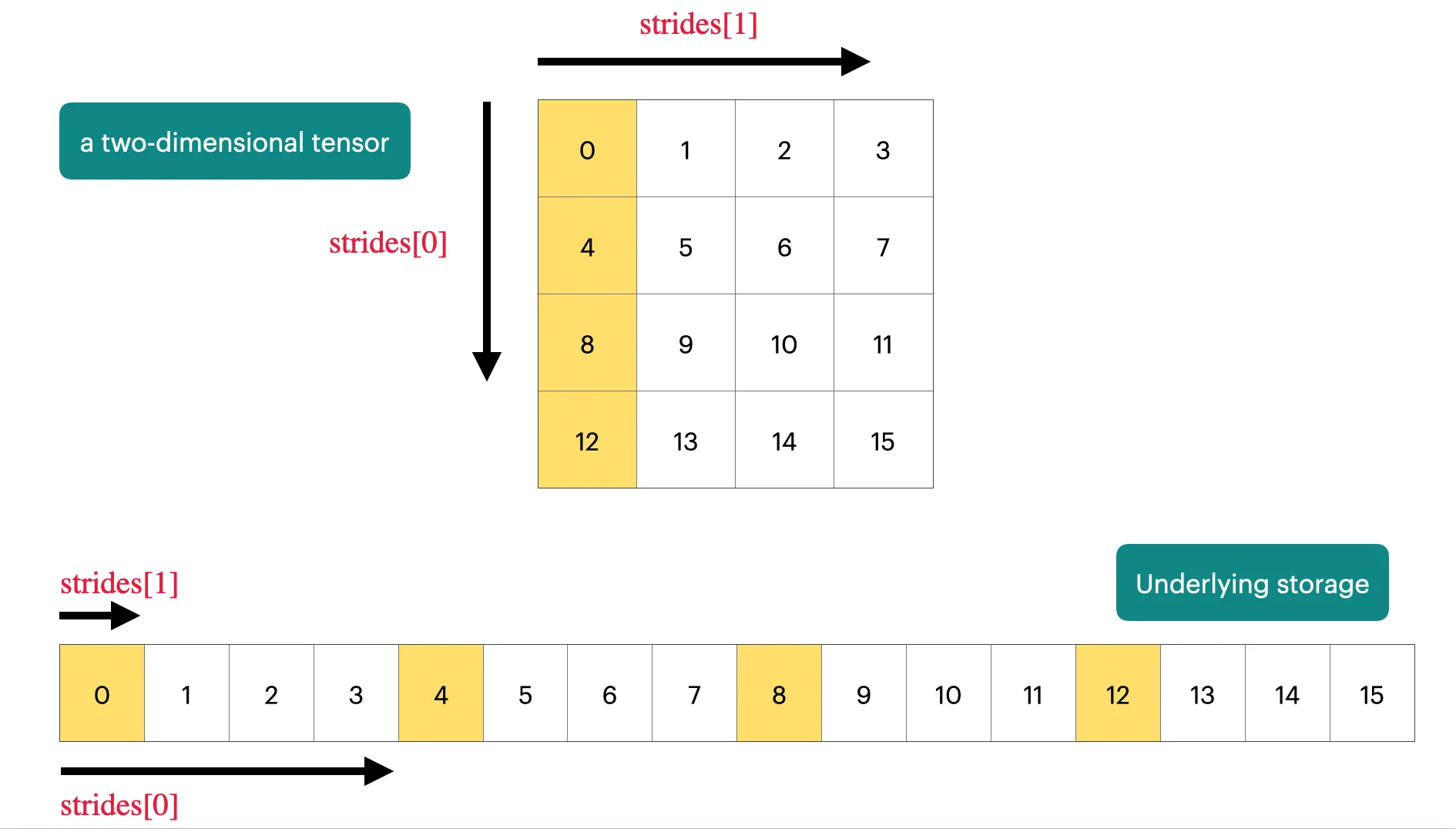
1. 存储(tensor_storage)[PyTorch docs]
- 张量本质是指向已分配内存的指针,加上元数据描述。
- 访问元素通过 stride(步长) 定位,例如行步长为 4,列步长为 1。
- 示例:
x[1,2]对应存储索引1*4 + 2*1 = 6。
import torch

# 创建一个 4x4 张量
x = torch.tensor([
    [0., 1, 2, 3],
    [4, 5, 6, 7],
    [8, 9, 10, 11],
    [12, 13, 14, 15],
])

# 张量的 stride 表示在某一维度上移动一个单位所需跳过的元素数
# dim=0 表示行方向,每下一行需要跳过 4 个元素
assert x.stride(0) == 4

# dim=1 表示列方向,每下一列需要跳过 1 个元素
assert x.stride(1) == 1

# 查找某个元素在内存中的索引
r, c = 1, 2
index = r * x.stride(0) + c * x.stride(1)  # 行偏移 + 列偏移
assert index == 6

print("张量:\n", x)
print("stride:", x.stride())
print(f"元素 x[{r}, {c}] 在存储中的索引: {index}, 值为: {x[r, c].item()}")
2. 切片与视图(tensor_slicing)
- 切片操作(取行、取列、转置、reshape 等)通常返回 视图,不复制数据,修改原张量会影响视图。
- 若视图是非连续内存(如转置),某些操作(如
.view())会报错,需要先.contiguous()。 - 视图开销为 0,复制操作则额外消耗内存和计算。
import torch

def same_storage(a: torch.Tensor, b: torch.Tensor) -> bool:
    """判断两个张量是否共享底层存储"""
    return a.storage().data_ptr() == b.storage().data_ptr()

# =========================================
# 张量视图 (View) 基础
# =========================================
x = torch.tensor([[1., 2, 3], [4, 5, 6]])  # @inspect x

# 1. 获取第 0 行
y = x[0]  # @inspect y
assert torch.equal(y, torch.tensor([1., 2, 3]))
assert same_storage(x, y)   # 共享存储

# 2. 获取第 1 列
y = x[:, 1]  # @inspect y
assert torch.equal(y, torch.tensor([2, 5]))
assert same_storage(x, y)   # 共享存储

# 3. 将 2x3 矩阵重新视为 3x2 矩阵
y = x.view(3, 2)  # @inspect y
assert torch.equal(y, torch.tensor([[1, 2], [3, 4], [5, 6]]))
assert same_storage(x, y)

# 4. 转置矩阵
y = x.transpose(1, 0)  # @inspect y
assert torch.equal(y, torch.tensor([[1, 4], [2, 5], [3, 6]]))
assert same_storage(x, y)

# 5. 修改原张量,视图也会同步改变
x[0][0] = 100  # @inspect x, @inspect y
assert y[0][0] == 100

# =========================================
# 非连续存储 (Non-contiguous) 的限制
# =========================================
x = torch.tensor([[1., 2, 3], [4, 5, 6]])  # @inspect x
y = x.transpose(1, 0)  # @inspect y
assert not y.is_contiguous()

# 尝试对非连续张量直接 view 会报错
try:
    y.view(2, 3)
    assert False
except RuntimeError as e:
    assert "view size is not compatible with input tensor's size and stride" in str(e)

# 解决方法:先 contiguous() 再 view
y = x.transpose(1, 0).contiguous().view(2, 3)  # @inspect y
assert not same_storage(x, y)  # 复制了存储
3. 元素级操作(tensor_elementwise)
- 对张量逐元素计算,返回相同形状的新张量。
- 示例:
pow、sqrt、+、、/等。 triu可取上三角矩阵,常用于因果注意力掩码。
import torch

# =========================================
# 张量的逐元素操作 (Element-wise operations)
# =========================================
x = torch.tensor([1, 4, 9])

# 幂运算
assert import torch

# =========================================
# 张量的逐元素操作 (Element-wise operations)
# =========================================
x = torch.tensor([1, 4, 9])   # 每个元素平方

# 开方
assert torch.equal(x.sqrt(), torch.tensor([1, 2, 3]))     # 每个元素开方

# 取倒数开方 (1/sqrt)
assert torch.equal(x.rsqrt(), torch.tensor([1, 1/2, 1/3]))

# 加法
assert torch.equal(x + x, torch.tensor([2, 8, 18]))

# 乘法
assert torch.equal(x * 2, torch.tensor([2, 8, 18]))

# 除法
assert torch.equal(x / 0.5, torch.tensor([2, 8, 18]))

# =========================================
# 上三角矩阵 (Upper triangular matrix)
# =========================================
x = torch.ones(3, 3).triu()  # @inspect x

expected = torch.tensor([
    [1, 1, 1],
    [0, 1, 1],
    [0, 0, 1],
])
assert torch.equal(x, expected)

# 这种上三角掩码常用于 **因果注意力 (causal attention mask)**,
# 其中 M[i, j] 表示位置 i 对位置 j 的贡献是否允许。
4. 矩阵乘法(tensor_matmul)
- 深度学习的核心操作。
- 示例:
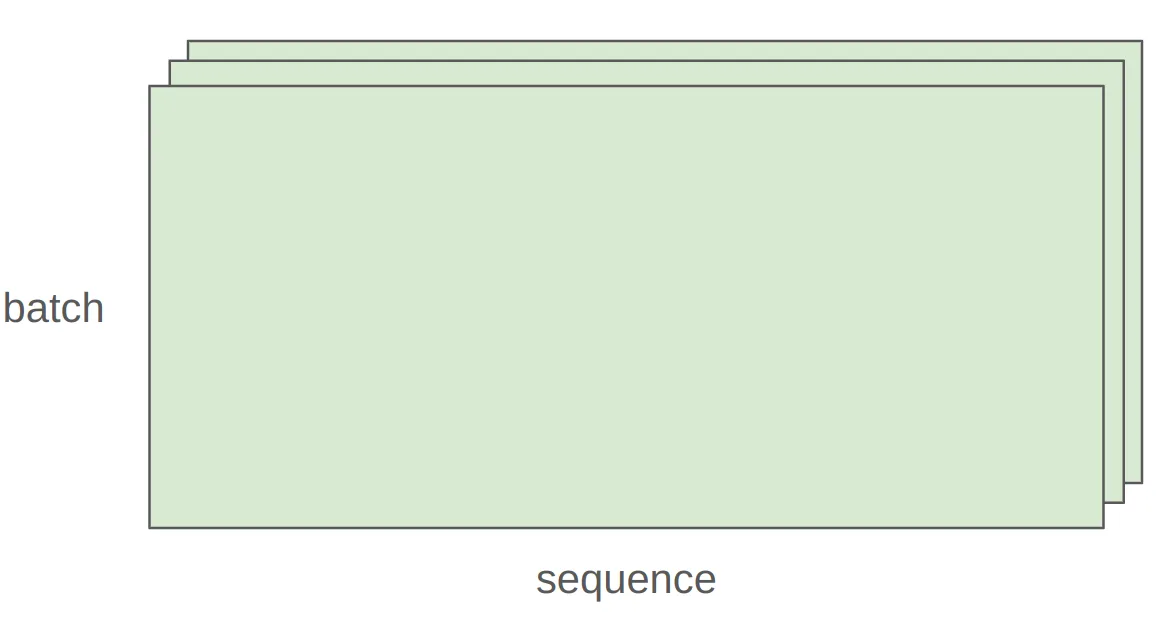
(16,32) @ (32,2) → (16,2)。 - 批量与序列维度会自动广播迭代,如
(4,8,16,32) @ (32,2) → (4,8,16,2)。
import torch

# =========================================
# 深度学习核心操作:矩阵乘法 (Matrix Multiplication)
# =========================================

# 单个矩阵乘法示例
x = torch.ones(16, 32)  # 输入矩阵:16 行 32 列
w = torch.ones(32, 2)   # 权重矩阵:32 行 2 列

y = x @ w  # 矩阵乘法
assert y.size() == torch.Size([16, 2])
print("y.shape:", y.shape)  # 输出: torch.Size([16, 2])

# =========================================
# 批处理和多维矩阵乘法
# =========================================
# 假设有一个 4 维张量,表示 batch x seq_len x dim1 x dim2
x = torch.ones(4, 8, 16, 32)
w = torch.ones(32, 2)

# 对最后两个维度执行矩阵乘法,前两个维度自动广播
y = x @ w
assert y.size() == torch.Size([4, 8, 16, 2])
print("y.shape (batch & sequence):", y.shape)

# 说明:
# 对于多维张量,矩阵乘法会在前面多余的维度上迭代,
# 类似于对每个 batch 和序列位置分别进行乘法。
Einops张量操作
Einops 是一个用于操作张量的库,其中的维数都是命名的。它的灵感来自爱因斯坦求和符号(爱因斯坦,1916 年)。[Einops tutorial]
Einops 动机:
提供以命名维度操作张量的方法,避免传统 PyTorch 操作中维度易混乱的问题(如 2, -1)。
import torch

# =========================================
# 批次与序列维度的矩阵乘法 (Batch & Sequence Matrix Multiplication)
# =========================================

# 输入张量:batch x sequence x hidden
x = torch.ones(2, 2, 3)  # @inspect x
y = torch.ones(2, 2, 3)  # @inspect y

# 对最后两个维度做矩阵乘法
# 注意 y 需要转置最后两个维度 (-2, -1) 才能匹配 x 的最后一维
z = x @ y.transpose(-2, -1)  # 结果 shape: batch x sequence x sequence  @inspect z

print("x.shape:", x.shape)  # torch.Size([2, 2, 3])
print("y.shape:", y.shape)  # torch.Size([2, 2, 3])
print("z.shape:", z.shape)  # torch.Size([2, 2, 2])
jaxtyping
为张量维度加注释,便于文档化维度信息,例如:
x: Float[torch.Tensor, "batch seq heads hidden"]
import torch
from jaxtyping import Float

# =========================================
# 张量维度管理示例 (Tracking Tensor Dimensions)
# =========================================

# 传统方式 (Old way)
x = torch.ones(2, 2, 1, 3)  # batch, seq, heads, hidden  @inspect x
print("x.shape (old way):", x.shape)  # torch.Size([2, 2, 1, 3])

# 新方式 (jaxtyping 风格,主要用于文档注释)
x: Float[torch.Tensor, "batch seq heads hidden"] = torch.ones(2, 2, 1, 3)  # @inspect x
print("x.shape (jaxtyping):", x.shape)  # torch.Size([2, 2, 1, 3])

# 注意:
# - jaxtyping 的注释只是文档说明,并不会强制类型或 shape。
# - 对大型模型或复杂张量计算,使用这种注释可以更清楚地记录维度语义。
einsum(推广矩阵乘法):
- 通过命名维度进行张量乘法,未在输出中出现的维度会被求和。
- 支持
...表示任意数量维度的广播。
import torch
from jaxtyping import Float
from torch import einsum

# =========================================
# 通用矩阵乘法:Einsum 示例
# =========================================

# 定义张量,使用 jaxtyping 注释维度
x: Float[torch.Tensor, "batch seq1 hidden"] = torch.ones(2, 3, 4)  # @inspect x
y: Float[torch.Tensor, "batch seq2 hidden"] = torch.ones(2, 3, 4)  # @inspect y

# -----------------------------------------
# 传统方式:矩阵乘法 + 转置
# -----------------------------------------
# 计算序列间相似度矩阵
z = x @ y.transpose(-2, -1)  # shape: batch x seq1 x seq2  @inspect z
print("z.shape (traditional):", z.shape)  # torch.Size([2, 3, 3])

# -----------------------------------------
# 新方式:einsum(使用命名维度)
# -----------------------------------------
# 明确维度对应关系
z_einsum = einsum("b i h, b j h -> b i j", x, y)
print("z_einsum.shape:", z_einsum.shape)  # torch.Size([2, 3, 3])

# 使用 ... 表示任意数量的前置维度(广播)
z = einsum("b i h, b j h -> b i j", x, y)
print("z.shape (torch.einsum):", z.shape)  # torch.Size([2, 3, 3])

# 说明:
# - einsum 可以自动对未在输出中出现的维度求和。
# - ... 可用于批次或额外维度的广播,简化多维计算。
reduce(降维操作):
- 可对张量沿指定维度进行 sum、mean、max、min 等操作。
- 示例:
reduce(x, "... hidden -> ...", "sum")
import torch
from jaxtyping import Float
from einops import reduce

# =========================================
# 张量归约操作 (Reduction)
# =========================================

# 定义张量并注释维度
x: Float[torch.Tensor, "batch seq hidden"] = torch.ones(2, 3, 4)  # @inspect x
print("x.shape:", x.shape)  # torch.Size([2, 3, 4])

# -----------------------------------------
# 传统方式:沿最后一维求均值
# -----------------------------------------
y = x.mean(dim=-1)  # @inspect y
print("y.shape (mean along hidden):", y.shape)  # torch.Size([2, 3])

# -----------------------------------------
# 新方式:einops reduce
# -----------------------------------------
# 对最后一维 hidden 进行求和
y = reduce(x, "... hidden -> ...", "sum")  # @inspect y
print("y.shape (einops sum):", y.shape)  # torch.Size([2, 3])

# 说明:
# - reduce 可以指定任意维度进行归约操作,如 "sum", "mean", "max", "min"。
# - 使用 "..." 可方便表示任意数量的前置维度,简化多维张量操作。
rearrange(重排维度):
- 可将单个维度拆分为多个维度,或将多个维度合并。
- 示例:
- 拆分:
rearrange(x, "... (heads hidden1) -> ... heads hidden1", heads=2) - 合并:
rearrange(x, "... heads hidden2 -> ... (heads hidden2)")
- 拆分:
- 可与
einsum结合进行复杂变换。
import torch
from jaxtyping import Float
from einops import rearrange, einsum

# =========================================
# 拆分和重组维度 + einsum 操作
# =========================================

# 定义张量,total_hidden 表示 heads * hidden1 的展开维度
x: Float[torch.Tensor, "batch seq total_hidden"] = torch.ones(2, 3, 8)  # @inspect x
print("x.shape (original):", x.shape)  # torch.Size([2, 3, 8])

# 权重矩阵
w: Float[torch.Tensor, "hidden1 hidden2"] = torch.ones(4, 4)

# -----------------------------------------
# 1. 拆分 total_hidden 为 heads 和 hidden1
# -----------------------------------------
x = rearrange(x, "... (heads hidden1) -> ... heads hidden1", heads=2)  # @inspect x
print("x.shape (after split):", x.shape)  # torch.Size([2, 3, 2, 4])

# -----------------------------------------
# 2. 对 hidden1 维度进行线性变换
# -----------------------------------------
x = einsum(x, w, "... hidden1, hidden1 hidden2 -> ... hidden2")  # @inspect x
print("x.shape (after einsum):", x.shape)  # torch.Size([2, 3, 2, 4])

# -----------------------------------------
# 3. 合并 heads 和 hidden2 回 total_hidden
# -----------------------------------------
x = rearrange(x, "... heads hidden2 -> ... (heads hidden2)")  # @inspect x
print("x.shape (after combine):", x.shape)  # torch.Size([2, 3, 8])

# 说明:
# - 这种操作常用于多头注意力或类似结构,将 flattened hidden 维度拆开处理后再合并。
# - einsum + rearrange 可以清晰地处理复杂的多维变换。
tensor_operations_flops
经过对各种张量操作的分析,需要关注它们的计算成本。浮点运算(FLOP)是基本操作,如加法或乘法。存在两个容易混淆的缩写:FLOPs 表示浮点运算的总量,用于衡量完成的计算量;FLOP/s(或 FLOPS)表示每秒浮点运算次数,用于衡量硬件的计算速度。
直觉
-
训练规模:
-
GPU 性能:
-
示例估算:
- 8 张 H100,连续运行 2 周
- 总计算量:
total_flops = 8 * 60*60*24*7 * h100_flop_per_sec
线性模型
- 输入:n个点,每个点是d维向量。
- 输出:将每个d维向量映射为k个输出。
计算示例
- 输入点数(B):16384
- 输入维度(D):32768
- 输出维度(K):8192
- 计算:矩阵乘法
y = x @ w。x的维度为(B, D)。w的维度为(D, K)。- 输出
y的维度为(B, K)。
- 浮点运算数(FLOPs):
x @ w涉及一次乘法和一次加法。- 每个输出值都需要D次乘法和D−1次加法,共约2D次运算。
- 总的FLOPs为2×B×D×K。
import torch

# 根据是否有 GPU 调整矩阵大小
if torch.cuda.is_available():
    B = 16384  # 点的数量 (batch size)
    D = 32768  # 特征维度
    K = 8192   # 输出维度
else:
    B = 1024
    D = 256
    K = 64

# 获取设备 (CPU 或 GPU)
device = torch.device("cuda" if torch.cuda.is_available() else "cpu")

# 输入张量和权重矩阵
x = torch.ones(B, D, device=device)
w = torch.randn(D, K, device=device)

# 矩阵乘法
y = x @ w
print("y.shape:", y.shape)  # torch.Size([B, K])

# =========================================
# 计算 FLOPs (浮点运算量)
# =========================================
# 对每个 (i, j, k) 三元组有一次乘法和一次加法
flops = B * D * K * 2
print(f"FLOPs for this matmul: {flops:.2e}")
其他操作的FLOPs
- 逐元素操作(Elementwise operation):对一个m×n矩阵进行逐元素操作,所需的FLOPs约为O(mn)。
- 矩阵加法:两个m×n矩阵相加,需要mn次浮点运算。
- 总结:在深度学习中,对于足够大的矩阵,矩阵乘法的计算成本远高于其他操作。
浮点运算与实际时间
-
理论与实际:线性模型前向传播的FLOPs可以概括为2×(tokens)×(parameters),这一规律在Transformer模型中也大致适用。
-
计算实际时间:
actual_time:通过对矩阵乘法进行计时获得实际耗时(以秒为单位)。actual_flop_per_sec:用总的FLOPs除以实际耗时,得到每秒的实际浮点运算次数。
pythonactual_time = time_matmul(x, w) # @inspect actual_time actual_flop_per_sec = actual_num_flops / actual_time # @inspect actual_flop_per_sec -
峰值性能:每个GPU都有一个规格表,会报告其峰值性能(如A100和H100)**[spec] [spec]。每秒浮点运算数(FLOP/s)**会根据使用的数据类型(如FP32、FP16)有很大差异。
模型浮点运算利用率(MFU)
- 定义:MFU是实际浮点运算速度(actual FLOP/s)与理论峰值浮点运算速度(promised FLOP/s)的比值。在计算时,可以忽略通信和开销的影响。
- 计算公式:MFU =
actual_flop_per_sec/promised_flop_per_sec - 评判标准:通常情况下,MFU达到0.5或更高就算相当不错,如果计算任务主要由矩阵乘法主导,MFU会更高。
BFloat16数据类型示例
- 将数据类型从
float32切换到bfloat16后,实际浮点运算速度(bf16_actual_flop_per_sec)会变高。 - 然而,示例中的MFU值较低,这可能是因为理论峰值(promised FLOPs)的计算过于乐观。
import torch

# =========================================
# 使用 bfloat16 进行矩阵乘法并计算 MFU
# =========================================

# 假设 x, w 已经定义好并在合适的设备上
# x: torch.Tensor of shape [B, D]
# w: torch.Tensor of shape [D, K]

# 转为 bfloat16 以加速计算
x = x.to(torch.bfloat16)
w = w.to(torch.bfloat16)

# 测量实际矩阵乘法时间
bf16_actual_time = time_matmul(x, w)  # @inspect bf16_actual_time
print("Actual time (bf16):", bf16_actual_time)

# 计算实际 FLOPs/s
bf16_actual_flop_per_sec = actual_num_flops / bf16_actual_time  # @inspect bf16_actual_flop_per_sec
print("Actual FLOPs/s (bf16):", bf16_actual_flop_per_sec)

# 获取设备理论峰值 FLOPs/s
bf16_promised_flop_per_sec = get_promised_flop_per_sec(device, x.dtype)  # @inspect bf16_promised_flop_per_sec
print("Promised FLOPs/s (bf16):", bf16_promised_flop_per_sec)

# 计算最大填充利用率 (MFU)
bf16_mfu = bf16_actual_flop_per_sec / bf16_promised_flop_per_sec
print("MFU (bfloat16):", bf16_mfu)

# 说明:
# - bfloat16 可以在保持精度的同时提高吞吐量
# - MFU(Maximum Filling Utilization) 衡量硬件利用效率
总结
- 矩阵乘法:计算量在深度学习中占主导地位,其浮点运算数(FLOPs)约为2×m×n×p。
- FLOP/s:每秒浮点运算数取决于硬件(例如H100优于A100)和数据类型(例如bfloat16的性能通常优于float32)。
- 模型浮点运算利用率(MFU):MFU是实际的FLOP/s与理论峰值FLOP/s的比值。
gradients
梯度计算基础
- 前向传播:将张量(数据或参数)通过一系列操作得到损失(loss)。
- 反向传播:根据损失计算出每个参数的梯度(gradient),即损失函数对参数的导数。
示例:简单线性模型
- 模型函数:
- 前向传播:
x:输入张量[1., 2, 3]。w:参数张量[1., 1, 1],设置requires_grad=True以便计算梯度。- 预测值
pred_y:x @ w得到1*1 + 2*1 + 3*1 = 6。 - 损失
loss:0.5 * (6 - 5)^2 = 0.5。
- 反向传播:
loss.backward()执行反向传播,自动计算梯度。- 最终,参数
w的梯度为**[1, 2, 3]*。 - 值得注意的是,
loss、pred_y和x等没有设置requires_grad=True的张量,其梯度为None。
import torch

# =========================================
# 简单线性模型正向和反向传播
# =========================================

x = torch.tensor([1., 2., 3])
w = torch.tensor([1., 1, 1], requires_grad=True)

# 前向传播
pred_y = x @ w
loss = 0.5 * (pred_y - 5).pow(2)

# 反向传播
loss.backward()

# 检查梯度
assert loss.grad is None
assert pred_y.grad is None
assert x.grad is None
assert torch.equal(w.grad, torch.tensor([1., 2., 3]))
gradient flops
前向传播 FLOPs
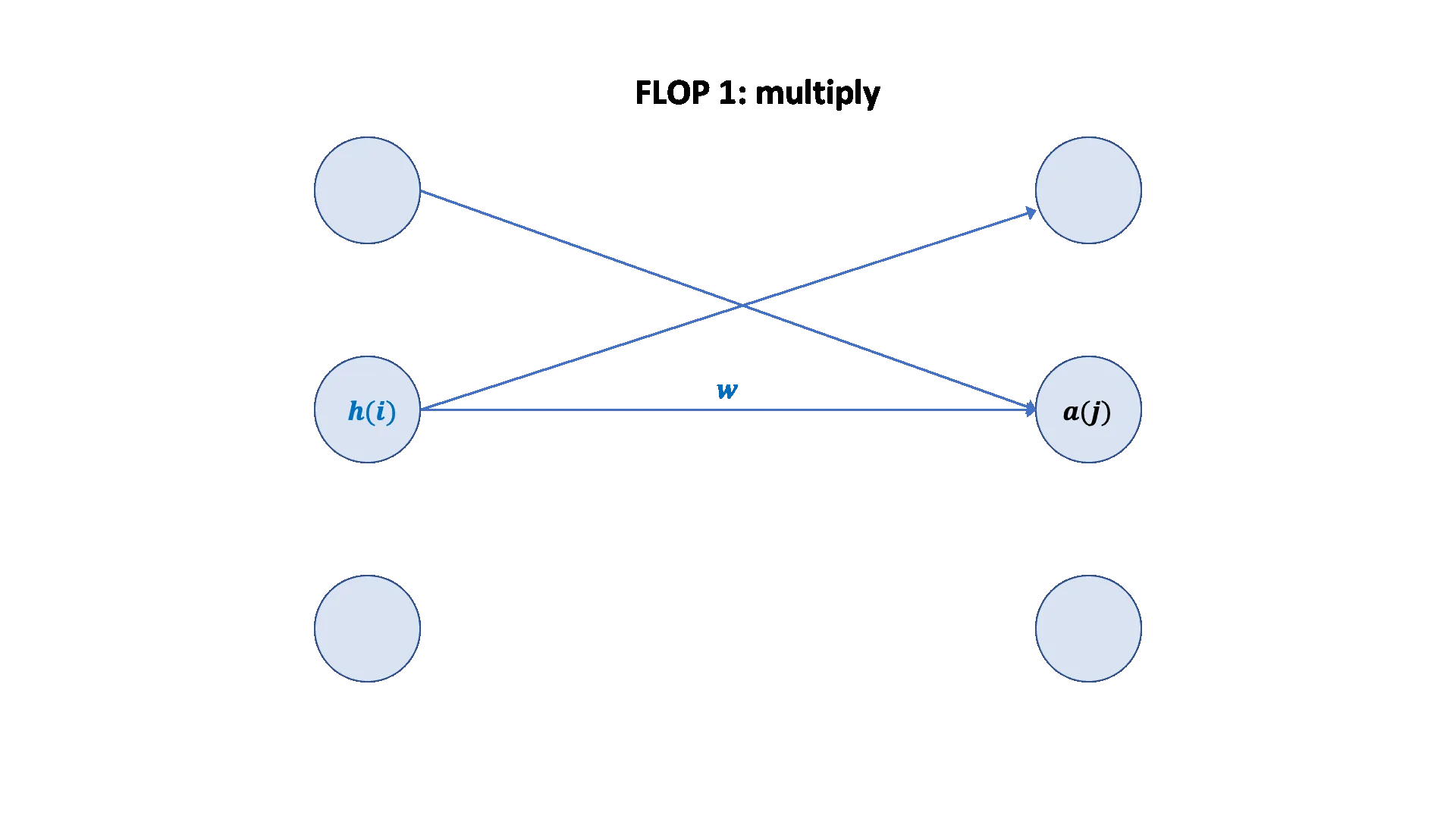
对于给定的线性模型:x --w1--> h1 --w2--> h2,其前向传播的总FLOPs等于两次矩阵乘法的FLOPs之和。
x @ w1:矩阵维度为(B, D)和(D, D)。FLOPs为2 * B * D * D。h1 @ w2:矩阵维度为(B, D)和(D, K)。FLOPs为2 * B * D * K。
因此,前向传播总FLOPs = (2 * B * D * D) + (2 * B * D * K)。
反向传播 FLOPs
反向传播(梯度计算)的FLOPs是前向传播的两倍。
- 计算
w2的梯度:w2.grad的计算涉及h1和h2.grad的矩阵乘法,这与前向传播中h1 @ w2的计算量类似。FLOPs约为2 * B * D * K。 - 计算
h1的梯度:h1.grad的计算涉及h2.grad和w2的矩阵乘法,FLOPs约为2 * B * D * K。 - 计算
w1和x的梯度:这一步的计算量类似。其中,w1.grad涉及x和h1.grad的矩阵乘法,FLOPs约为2 * B * D * D;x.grad涉及h1.grad和w1的矩阵乘法,FLOPs约为2 * B * D * D。
因此,反向传播总FLOPs = (2 * B * D * K) + (2 * B * D * K) + (2 * B * D * D) + (2 * B * D * D),约等于前向传播总FLOPs的两倍。
- 前向传播:FLOPs约为**
2 * (数据点数) * (参数数量)*。 - 反向传播:FLOPs约为**
4 * (数据点数) * (参数数量)*。 - 总FLOPs:训练过程的总FLOPs(前向 + 反向)约为**
6 * (数据点数) * (参数数量)*。
A nice graphical visualization: [article]
import torch

# =========================================
# 计算线性模型的前向和反向 FLOPs
# =========================================

# 设置矩阵大小
if torch.cuda.is_available():
    B, D, K = 16384, 32768, 8192
else:
    B, D, K = 1024, 256, 64

device = torch.device("cuda" if torch.cuda.is_available() else "cpu")

# 定义输入和参数
x = torch.ones(B, D, device=device)
w1 = torch.randn(D, D, device=device, requires_grad=True)
w2 = torch.randn(D, K, device=device, requires_grad=True)

# 前向传播
h1 = x @ w1
h2 = h1 @ w2
loss = h2.pow(2).mean()

# 计算前向 FLOPs
num_forward_flops = (2 * B * D * D) + (2 * B * D * K)  # @inspect num_forward_flops

# 保留中间梯度
h1.retain_grad()
h2.retain_grad()

# 反向传播
loss.backward()

# 计算 w2 相关的反向 FLOPs
num_backward_flops = 0
num_backward_flops += 2 * B * D * K  # w2.grad
num_backward_flops += 2 * B * D * K  # h1.grad
num_backward_flops += (2 + 2) * B * D * D  # w1.grad  # @inspect num_backward_flops

# 检查维度
assert w2.grad.size() == torch.Size([D, K])
assert h1.size() == torch.Size([B, D])
assert h2.grad.size() == torch.Size([B, K])
assert h1.grad.size() == torch.Size([B, D])
assert w2.size() == torch.Size([D, K])
模型参数
- 存储方式:模型参数在PyTorch中
nn.Parameter对象的形式存储,它本质上是一种特殊的张量(torch.Tensor),可以通过.data属性访问底层张量。
参数初始化
- 问题:当未经过特殊初始化时,模型输出的数值会随着输入维度(
input_dim)的增加而不成比例地增大,其增长速率为\sqrt{\text{input_dim}}。这可能导致梯度爆炸,使模型训练变得不稳定。 - 解决方案:为了使输出值不受输入维度的影响,需要对参数进行重新缩放,方法是将参数除以1/sqrt(input_dim)。
- 结果:重新缩放后,模型的输出值将保持在一个恒定的范围内,从而使得训练更稳定。
- 初始化方法:这种重新缩放的初始化方法,在加入常数因子后,即为Xavier初始化。
- 额外安全措施:为了避免正态分布中可能出现的离群值(outliers),可以额外将正态分布截断到
[-3, 3]的范围内。
import torch
import torch.nn as nn
import numpy as np

input_dim, output_dim = 16384, 32

# 模型参数是 nn.Parameter
w = nn.Parameter(torch.randn(input_dim, output_dim))
assert isinstance(w, torch.Tensor)
assert isinstance(w.data, torch.Tensor)

# 普通初始化 -> 输出随 √input_dim 变大
x = nn.Parameter(torch.randn(input_dim))
out1 = x @ w  # ~ O(√input_dim)

# Xavier 初始化 (缩放 1/√input_dim)
w2 = nn.Parameter(torch.randn(input_dim, output_dim) / np.sqrt(input_dim))
out2 = x @ w2  # ~ O(1)

# 截断正态分布 (更安全)
w3 = nn.Parameter(
    nn.init.trunc_normal_(
        torch.empty(input_dim, output_dim),
        std=1 / np.sqrt(input_dim),
        a=-3, b=3
    )
)
out3 = x @ w3  # ~ O(1)
Custom model
import torch
import torch.nn as nn
import numpy as np

# ---- 定义简单线性层 ----
class Linear(nn.Module):
    """Simple linear layer."""
    def __init__(self, input_dim: int, output_dim: int):
        super().__init__()
        self.weight = nn.Parameter(
            torch.randn(input_dim, output_dim) / np.sqrt(input_dim)
        )

    def forward(self, x: torch.Tensor) -> torch.Tensor:
        return x @ self.weight

# ---- 定义深度线性模型 ----
class Cruncher(nn.Module):
    def __init__(self, dim: int, num_layers: int):
        super().__init__()
        self.layers = nn.ModuleList([
            Linear(dim, dim) for _ in range(num_layers)
        ])
        self.final = Linear(dim, 1)

    def forward(self, x: torch.Tensor) -> torch.Tensor:
        B, D = x.size()
        for layer in self.layers:
            x = layer(x)
        # Final projection
        x = self.final(x)
        assert x.size() == torch.Size([B, 1])
        return x.squeeze(-1)

# ---- 工具函数 ----
def get_num_parameters(model: nn.Module) -> int:
    return sum(p.numel() for p in model.parameters())

def get_device() -> torch.device:
    return torch.device("cuda" if torch.cuda.is_available() else "cpu")

# ---- custom_model 示例 ----
def custom_model():
    D = 64   # Dimension
    num_layers = 2
    model = Cruncher(dim=D, num_layers=num_layers)

    # 检查参数大小
    param_sizes = [(name, param.numel()) for name, param in model.state_dict().items()]
    assert param_sizes == [
        ("layers.0.weight", D * D),
        ("layers.1.weight", D * D),
        ("final.weight", D),
    ]

    # 参数总数
    num_parameters = get_num_parameters(model)
    assert num_parameters == (D * D) + (D * D) + D

    # 移动到 GPU
    device = get_device()
    model = model.to(device)

    # 运行模型
    B = 8  # Batch size
    x = torch.randn(B, D, dev
get batch
- 目标:从给定的数据数组
data中,随机采样出batch_size个序列,每个序列的长度为sequence_length。 - 实现步骤:
- 随机采样起始位置:使用
torch.randint随机生成batch_size个起始索引start_indices,确保每个索引都可以在数据范围内截取一个完整的序列。 - 索引数据:利用列表推导式,根据
start_indices索引到data中,构建一个大小为[batch_size, sequence_length]的输入张量x。
- 随机采样起始位置:使用
内存管理与异步传输
- 固定内存(Pinned Memory):
- 默认情况下,CPU张量存储在分页内存(paged memory)中。
- 通过调用
.pin_memory(),可以将张量显式地放入固定内存中。
- 异步复制:
- 将张量从固定内存复制到GPU时,可以设置
non_blocking=True。 - 这样做的好处是,CPU可以并行执行其他任务(例如获取下一个数据批次),而无需等待张量复制到GPU完成。
- 将张量从固定内存复制到GPU时,可以设置
- 并行优势:这种异步传输机制使得数据加载(在CPU上)和模型计算(在GPU上)可以重叠,从而提高训练效率。
import torch
import numpy as np

def get_batch(data: np.ndarray, batch_size: int, sequence_length: int, device: str) -> torch.Tensor:
    """
    Sample a random batch of sequences from data.

    Args:
        data: numpy array of data
        batch_size: number of sequences per batch
        sequence_length: length of each sequence
        device: target device ("cpu" or "cuda")

    Returns:
        x: torch.Tensor [batch_size, sequence_length]
    """
    # 随机选择起始位置
    start_indices = torch.randint(len(data) - sequence_length, (batch_size,))
    assert start_indices.size() == torch.Size([batch_size])

    # 构造 batch
    x = torch.tensor(
        [data[start:start + sequence_length] for start in start_indices],
        dtype=torch.float32
    )
    assert x.size() == torch.Size([batch_size, sequence_length])

    # 固定内存 (提高 CPU→GPU 数据拷贝效率)
    if torch.cuda.is_available():
        x = x.pin_memory()

    # 传输到设备
    x = x.to(device, non_blocking=True)

    return x
随机性与可复现性
- 随机性来源:随机性出现在多个环节,包括参数初始化、Dropout(一种正则化技术)和数据排序等。
- 可复现性(Reproducibility):为了确保每次运行结果一致,尤其在调试时,强烈建议始终为每次随机操作设置一个固定的随机种子(random seed)。
- 好处:通过固定随机种子,可以确定性地重现模型的行为,从而更容易定位并修复代码中的错误。
设置随机种子
为了确保完全的可复现性,应在三个主要库中同时设置随机种子:
- PyTorch:使用
torch.manual_seed(seed)。 - NumPy:使用
np.random.seed(seed)。 - Python:使用
random.seed(seed)。
数据加载
- 数据格式:语言模型的数据通常是分词器(tokenizer)输出的整数序列。
- 存储方式:这些序列可以被序列化为
numpy数组,并以.npy文件格式存储,以便于加载。
高效加载大型数据集
- 内存映射(Memory-mapping):当处理如LLaMA数据集(2.8TB)这样的大型数据集时,不能一次性将所有数据加载到内存中。
np.memmap:numpy的内存映射功能允许延迟加载(lazily load)数据。这意味着只有在访问数据文件的特定部分时,才会将其加载到内存中,从而节省了大量的RAM。- 数据加载器(data loader):数据加载器的作用是为训练模型生成一个批次(batch)的序列。它会从数据集中采样出固定大小(
B)和固定长度(L)的序列,形成一个大小为[B, L]的张量。
SGD(随机梯度下降)
class SGD(torch.optim.Optimizer):
    def __init__(self, params: Iterable[nn.Parameter], lr: float = 0.01):
        super(SGD, self).__init__(params, dict(lr=lr))

    def step(self):
        for group in self.param_groups:
            lr = group["lr"]
            for p in group["params"]:
                grad = p.grad.data
                p.data -= lr * grad
特点:
- 最基础的优化器
- 更新公式:
p = p - lr * grad
AdaGrad
class AdaGrad(torch.optim.Optimizer):
    def __init__(self, params: Iterable[nn.Parameter], lr: float = 0.01):
        super(AdaGrad, self).__init__(params, dict(lr=lr))

    def step(self):
        for group in self.param_groups:
            lr = group["lr"]
            for p in group["params"]:
                state = self.state[p]
                grad = p.grad.data
                g2 = state.get("g2", torch.zeros_like(grad))
                g2 += torch.square(grad)
                state["g2"] = g2
                p.data -= lr * grad / torch.sqrt(g2 + 1e-5)
特点:
- 对梯度平方进行累计
- 对学习率做自适应缩放
优化器家族关系
- Momentum = SGD + 梯度指数平均
- AdaGrad = SGD + 梯度平方平均
- RMSProp = AdaGrad + 梯度平方指数平均
- Adam = RMSProp + Momentum
参考论文:AdaGrad
基本训练流程
def train(name: str, get_batch, D: int, num_layers: int, B: int, num_train_steps: int, lr: float):
    model = Cruncher(dim=D, num_layers=num_layers).to(get_device())
    optimizer = SGD(model.parameters(), lr=lr)
    for t in range(num_train_steps):
        x, y = get_batch(B=B)
        pred_y = model(x)
        loss = F.mse_loss(pred_y, y)
        loss.backward()
        optimizer.step()
        optimizer.zero_grad(set_to_none=True)
数据生成示例
def get_batch(B: int) -> tuple[torch.Tensor, torch.Tensor]:
    D = 16
    true_w = torch.arange(D, dtype=torch.float32, device=get_device())
    x = torch.randn(B, D).to(get_device())
    true_y = x @ true_w
    return x, true_y
检查点(Checkpointing)
保存训练状态,避免训练中断导致的数据丢失:
model = Cruncher(dim=64, num_layers=3).to(get_device())
optimizer = AdaGrad(model.parameters(), lr=0.01)

# 保存
checkpoint = {
    "model": model.state_dict(),
    "optimizer": optimizer.state_dict(),
}
torch.save(checkpoint, "model_checkpoint.pt")

# 加载
loaded_checkpoint = torch.load("model_checkpoint.pt")
混合精度训练(Mixed Precision Training)
- 高精度(float32):稳定、准确,但消耗内存和计算
- 低精度(bfloat16, fp8):节省资源,但可能不稳定
- 解决方案:前向传播使用低精度,参数和梯度保持 float32
PyTorch AMP:官方文档
NVIDIA Transformer Engine 支持 FP8:参考论文
内存与 FLOPs 估算
def get_memory_usage(x: torch.Tensor):
    return x.numel() * x.element_size()

def get_num_parameters(model: nn.Module) -> int:
    return sum(param.numel() for param in model.parameters())

def get_promised_flop_per_sec(device: str, dtype: torch.dtype) -> float:
    ...
示例:
- 参数数量:
num_parameters = D*D*num_layers + D - 激活数量:
num_activations = B * D * num_layers - 梯度数量:
num_gradients = num_parameters - 优化器状态:
num_optimizer_states = num_parameters - 总内存(float32):
total_memory = 4 * (num_parameters + num_activations + num_gradients + num_optimizer_states) - FLOPs(单步):
flops = 6 * B * num_parameters
工具函数
def same_storage(x: torch.Tensor, y: torch.Tensor):
    return x.untyped_storage().data_ptr() == y.untyped_storage().data_ptr()

def time_matmul(a: torch.Tensor, b: torch.Tensor) -> float:
    ...

def get_device(index: int = 0) -> torch.device:
    if torch.cuda.is_available():
        return torch.device(f"cuda:{index}")
    else:
        return torch.device("cpu")
7. 总结
- 优化器:理解不同算法及其适用场景(SGD, AdaGrad, RMSProp, Adam)
- 训练流程:数据 -> forward -> loss -> backward -> update
- 内存与计算:关注参数、激活、梯度、优化器状态
- 混合精度训练:在保持稳定性的同时节省内存和计算